URL Encoding vs Base64: When to Use Each Method
URL Encoding and Base64 are both transformation methods, but they solve different transport problems. URL Encoding protects reserved characters when values are placed in URLs. Base64 converts binary or structured data into text-safe representation for channels that expect plain text. Mixing these two methods causes broken query parameters, unreadable payloads, and hard-to-debug integration issues. This guide gives a clear decision framework so your team chooses the right method every time.

Choose encoding by transport context, not by habit.
Core difference: purpose and context
URL Encoding is for URLs. It escapes reserved characters such as spaces, ampersands, slashes, and question marks so parameters stay structurally valid. For example, a space becomes %20 and an ampersand in a value becomes %26.
Base64 is for payload transport. It converts raw bytes to ASCII characters so data can pass through systems that are text-oriented. It is common for attachments, tokens, and binary-safe transport in APIs.
If the destination is a URL component, use URL Encoding. If the destination is a text channel carrying binary or structured bytes, use Base64.
Quick comparison table
| Method | Use it for | Avoid it for |
|---|---|---|
| URL Encoding | Query strings, path segments, special characters in URLs | Encoding binary file content for transport |
| Base64 | Binary/text-safe payload transport, embedded data blobs | Replacing normal URL parameter escaping |
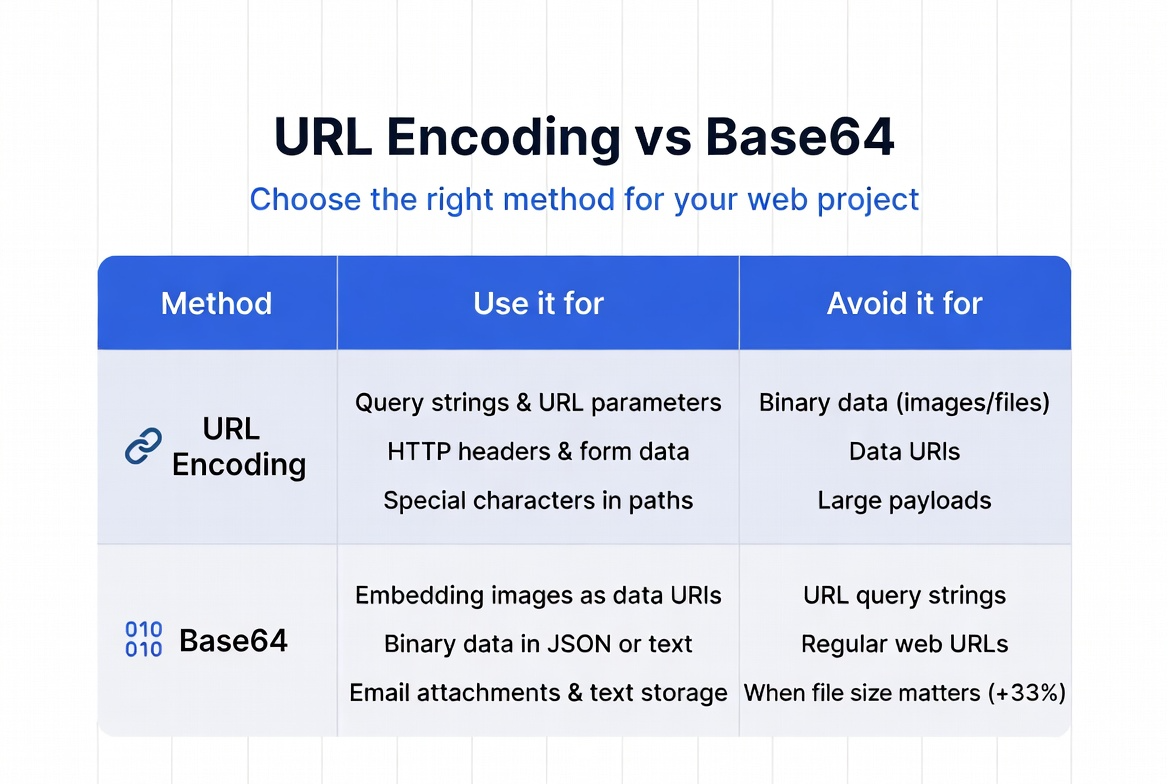
The same input may need different encoding depending on where it is sent.
When to use URL Encoding
- Passing user input in query parameters.
- Building redirect URLs safely.
- Encoding path segments that include spaces or reserved symbols.
- Preventing URL parsing errors in tracking links and callbacks.
When to use Base64
- Transmitting binary-like data through text-only systems.
- Embedding small data blobs (with caution) where binary cannot be passed directly.
- Serializing payload fragments that must remain text-safe end-to-end.
- Transporting content through systems that may break raw byte streams.
Base64 increases size by roughly one-third, so avoid it when simple URL Encoding is enough.
Most common mistakes and how they break systems
- Double URL Encoding: Encoding already encoded values creates broken redirects and invalid query parsing.
- Using Base64 for query params by default: Inflates URL size and complicates debugging.
- Using URL Encoding for binary transport: Produces fragile payloads and unexpected decoding failures.
- Not decoding at the right layer: Creates mismatched data expectations across services.

Most encoding bugs are process bugs, not algorithm bugs.
Decision workflow for reliable implementation
- Ask where the value goes: URL component or payload body.
- If URL component: apply URL Encoding only.
- If binary/text-safe payload transport: apply Base64.
- Decode exactly once: at the correct receiving layer.
- Add tests: include characters like space, plus, ampersand, slash, and unicode.

A simple decision tree removes most encoding ambiguity in teams.
Frequently Asked Questions
A: No. Base64 is encoding, not encryption. It makes data transport-safe, but it does not provide secrecy.
A: Usually no. Encode only the parameter values or specific segments that need escaping.
A: Yes, but only when flow requires it. For example, Base64 output placed inside a URL parameter may still need URL Encoding for safe transport.
A: Some parsers treat plus as space in query contexts. Proper URL Encoding avoids ambiguity and preserves intent.
Use the right encoder with confidence
Apply the decision rule from this guide in your team standards: URL context means URL Encoding, payload context means Base64. This single rule prevents many production bugs and support tickets.